Setting Up a Local LLM
With GGML and without Pytorch

I’ve got an old-ish PC with a GTX 1050 Ti that seems to support CUDA. As per the previous article, my gaming days are done for, so... let’s try and run a local LLM.
As I've learned later, my CUDA is incompatible with pytorch, I need to use another intermediate layer. Fortunately, GGML works and it's included in Ollama, so that's what we can use. Here's a good place to mention you shouldn't expose Ollama to the public internet.
Then we can build upon that with OpenWebUI for a pleasant web experience with plenty of features included, like RAG or TTS. Using wireguard I can make this available from the public internet.
After building local models from GGUF files with mixed success, the last thing I've tried is image generation with stable-diffusion.cpp and Chroma quantizied to 2 bits (😭) to get one image in 15minutes and a lot of fan-spinning. This setup isn't good for serious image generation (and don't even think about video).
Here's the full story/notes of how I got all of that running.

Preparing The System
My gaming desktop has actually three hard-drives. SSD-1 has Windows, SSD-2 has Linux and HDD has the data, so that I can boot what I need at the moment. I haven’t touched the Linux system on that machine in a while. So naively I’ve started the PC, hit the updates and after a while I saw this:
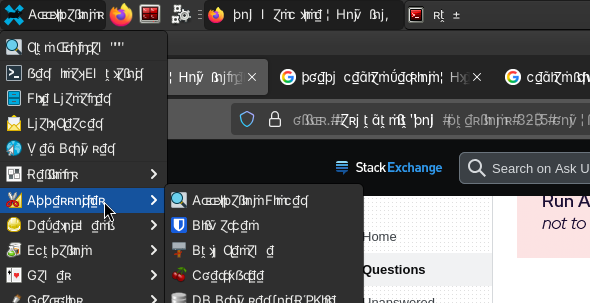
Since that is clearly cursed, I’ve decided to do a fresh install. I am now a proud owner of a Debian 13 Trixie fresh install (with XFCE).
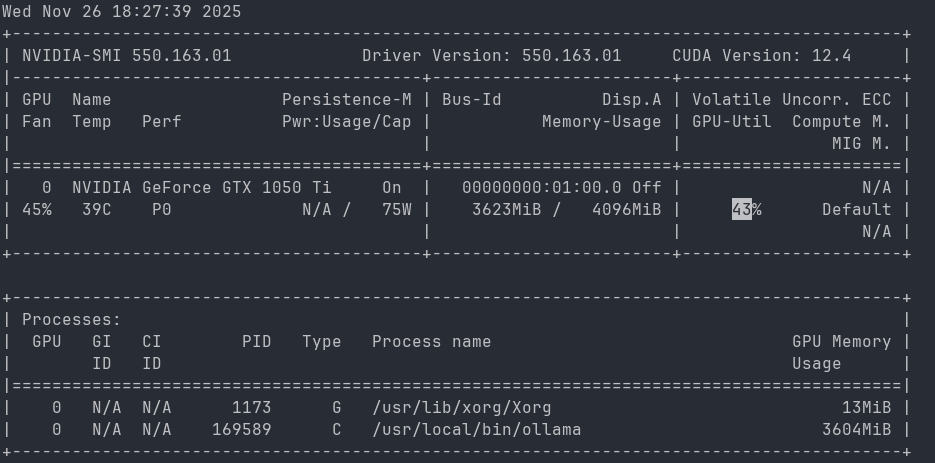
First, we’ll need CUDA. Fortunately, the GPU supports it, so we can follow the debian guide and the Nvidia official guide. Add non-free contrib to your apt repositories and we’re good to go.
Maybe I got lucky (hindsight: yes I did). I saw the memes about how hard is to install CUDA, but even on such an old GPU with such a new system, it was a breeze.
Anyway, I found the following reference from James Akl, maybe it'd help someone someday.
Model Selection
We are really scraping the bottom of the barrel with this setup, but there are a couple of possibilities. Also, I am by no means an expert in this matter, I am writing this section as a reference for me that might help someone else.
The parameters are a metric of a model size. The more parameters the more adidas, but also the more resources you need to run the model.
The science has advanced a bit and we can take advantage of quantization - basically, lowering the precision of weights to lower the cost of the models while hopefully keeping some of the result quality (think of it like image compression).
Then I’ve found a rule of thumb formula which gives our 4GB of VRAM (+ some CPU/RAM offloading) enough juice to try for 10B parameters. It's not so much about the raw compute power, but the memory capacity.
The best list of models I’ve found is on huggingface. Can’t link it directly, but look at API->Models->Text Models. Specifically, I am looking at:
- Mistral-7B - you know I love French models. As I was writing this, there has been a Mistral3 release, so I am looking forward to that too!
- Llama-3.1-8B-Instruct (and related) - provided by Meta, very popular.
- Qwen3-8B - the successor of Qwen2.5-7B (and Qwen2.5-7B-Instruct) - from China.
- Deepseek-R1-0528-Qwen3-8B - you can distill models. I’d love to tell you more, but I can’t. Also from China.
- Falcon3-7B-Instruct - an Arabian model from UAE.
- Gemma2-9B - made by Google.
- Anything Smollm, ranging from 2B to 100M!!
- LLava - multimodal (pictures/text) model with 7B parameters.
There are also specialized models, which have severely limited capabilities, but also sizes - to a point where you can run some of them on a potato, like embedding models or these prompt guards from meta.
Benchmarks
So how do we actually pick one? There are plenty of benchmarks that try to measure various abilities of LLMs. These include, but are not limited to general knowledge, math, coding, ability to follow instructions and plenty others.
Then I've found this post at reddit by "ClarityInMadness" and I'd like to keep it for reference, so I am reposting it now:
- https://scale.com/leaderboard/mask MASK is the only alignment benchmark that I know of. It measures how frequently an LLM lies when given the incentive to do so. The answers are classified as True, Evasive or Lie, and models are ranked based on 1-p(Lie).
- https://scale.com/leaderboard/humanitys_last_exam Humanity's Last Exam (HLE) is a popular benchmark with PhD-level questions. Made by the same guys who made MASK.
- https://www.virologytest.ai/ what I like about this one is the inclusion of expert percentiles, aka "this LLM performs better than x% of human experts". I wish more benchmarks had human percentiles. Btw, this data suggests that in the next 4-5 years LLMs might become better at virology than even the best human experts.
- https://livebench.ai a benchmark that measures many different capabilities. You can sort models by the weighted score or by scores on different sub-tasks.
- https://livecodebenchpro.com/ measures how well LLMs can solve competitive coding problems. When looking at percentages for "Hard" problems, keep in mind that "hard" in this context means "99.9% of competitive coders can't solve these problems".
- https://aider.chat/docs/leaderboards/ a more practical coding benchmark.
- https://cybench.github.io/ a benchmark for evaluating how good LLMs are at cybersecurity stuff.
- https://arcprize.org/leaderboard a popular benchmark for measuring LLM's ability to solve puzzles.
- https://geobench.org/ a benchmark for measuring how good LLMs are at Geoguessr: identifying the location where a photo was taken. This is like the No Moving, Panning, or Zooming mode in Geoguessr, where all you have to work with is just one static image.
- https://www.forecastbench.org/leaderboards/human_leaderboard_overall.html measures LLM's ability to forecast future events (think "being good on prediction markets").
- https://videommmu.github.io/#Leaderboard measures the ability to understand videos and how much watching a video helps LLMs to solve relevant problems, aka whether LLMs can apply what they just learned.
- https://balrogai.com/ measures the ability to play videogames.
- https://github.com/vectara/hallucination-leaderboard?tab=readme-ov-file#hallucination-leaderboard measures how much LLMs hallucinate when summarizing a text.
- https://lechmazur.github.io/leaderboard1.html is similar to the one above. It measures how frequently LLMs hallucinate when using Retrieval-Augmented Generation (RAG). This benchmark is deliberately designed to be challenging.
- https://cbrower.dev/vpct measures the ability to solve very easy (for humans) physics puzzles. Seriously, take a look, these puzzles are easy. It's very interesting that LLMs suck at this while showing impressive capabilities elsewhere.
- https://andonlabs.com/evals/vending-bench measures the ability to manage a vending machine - order supplies, keep track of inventory, choose prices, etc. - in a simulated environment.
- https://simple-bench.com/ it evaluates "linguistic adversarial robustness" aka ability to answer trick questions. While I'm not a huge fan of this kind of stuff, it can be interesting.
Ollama
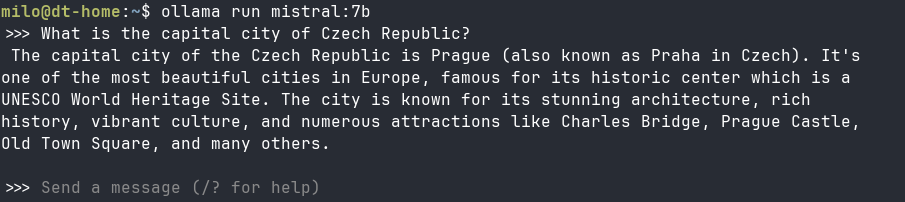
Next piece is ollama - a popular choice for local LLMs. Run curl -fsSL https://ollama.com/install.sh | sh . You can either load models from Ollama repos or you can directly include a hugging-face link. I have no notes, it works:
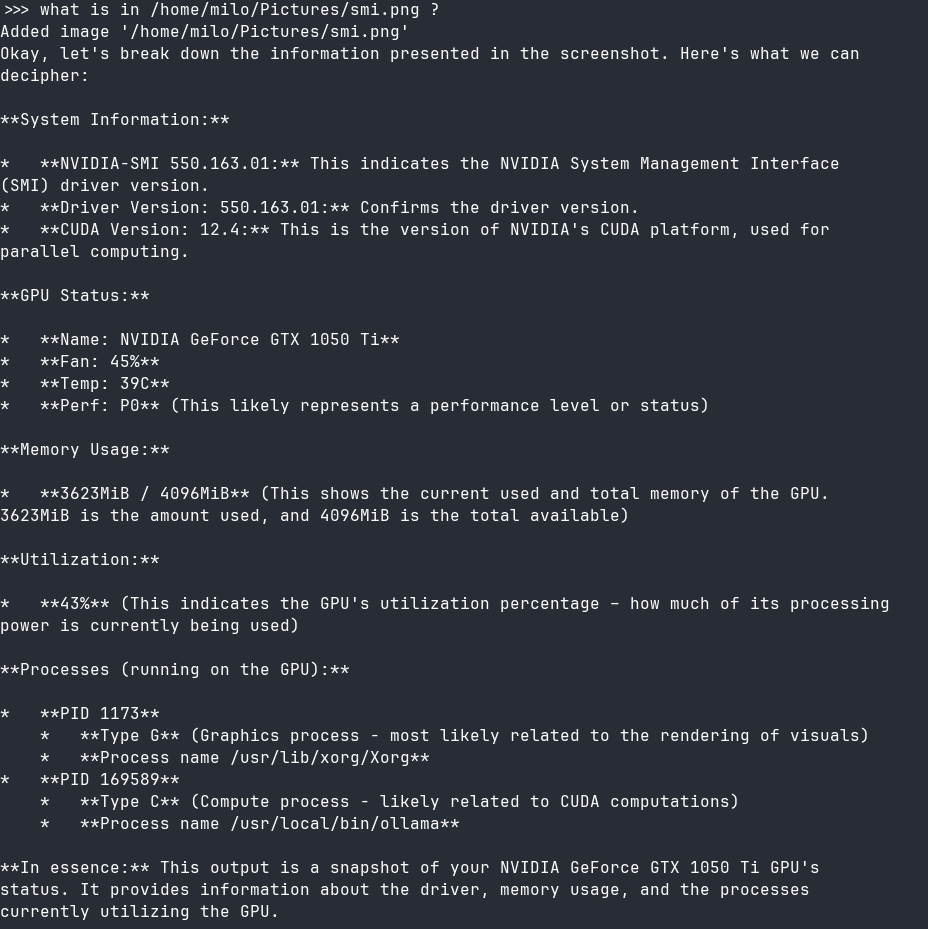
Surprisingly, I am also able to run a Gemma3 vision-capable model:
Open Web UI
I’ve explored some capabilities and recommendations and decided to try OpenWebUI. I'll call it OWU from now on (should be OWUI, but OWU sounds more funny to me). While I already have a librechat install, it seems that the RAG capabilities are limited, code execution depends on an API and couple other issues.
I had to do a side-step with pyenv install 3.12.9 since on trixie you get python3.13 which is incompatible with open-webui[all]. Then create a virtual env with a small shuffle:
mkdir open-webui
cd open-webui
pyenv local 3.12.9
pyenv exec python3 -m venv .venv
source .venv/bin/activate
pip install open-webui[all]
Postgres with pgvector
I wanted to try this with a serious database, so postgres it is. The pgvector extension seems to be popular. Don’t forget to also grab apt-get install python3-dev libpq-dev.
Once we have postgres, we need to create a DB, enable pgvector, setup the user like so:
CREATE USER openwebui WITH ENCRYPTED PASSWORD 'fix_the_password!';
CREATE DATABASE openwebui OWNER openwebui;
\c openwebui;
CREATE EXTENSION vector;
Then you have what you need to instruct OWU to use the DB. Check SQLAlchemy URL description, in this case it’s postgresql://openwebui:fix_the_password@localhost:5432/openwebui.
Configuring
Then we’ll take a gauntlet of env variables to prepare the configuration. We need to enable user creation, but I highly recommend disabling it if you’d like to make this available on the public internet (which I want to).
Prepare those variables in a file for easier setup. We can also use a small start-up script like so:
#!/usr/bin/env bash

set -a
source /root/open-webui/env
source /root/open-webui/.venv/bin/activate
set +a

# in my case, this makes it available both for my LAN and for the wireguard.
# don't do this if you're already on an internet reachable IP.
open-webui serve --host 0.0.0.0 --port 2000
Publishing
To actually connect my home machine to a VPS reachable from the public internet, I’ve used wireguard, almost literally followed the quickstart. Works great, don’t forget to keepalive connection from your inner server as it’s not pingable from the public internet.
As they say, the rest is technique - grab a subdomain, setup nginx reverse proxy (don’t forget the websocket support!), get a let’s encrypt certificate...
First attempt at exploitation came 23s after it went online. I wouldn't want it any other way.
The Setup (Mostly) Works
Working Features
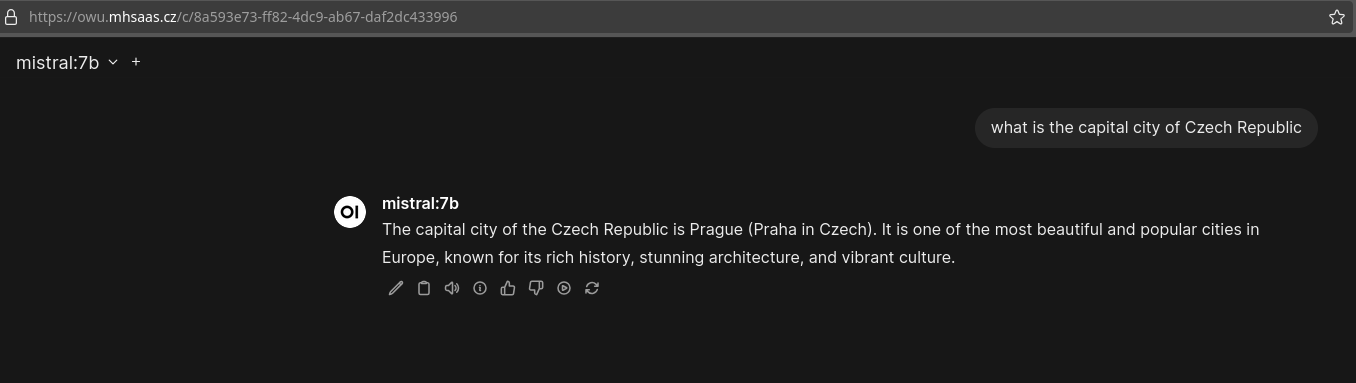
Ok, so the base installation works as intended:
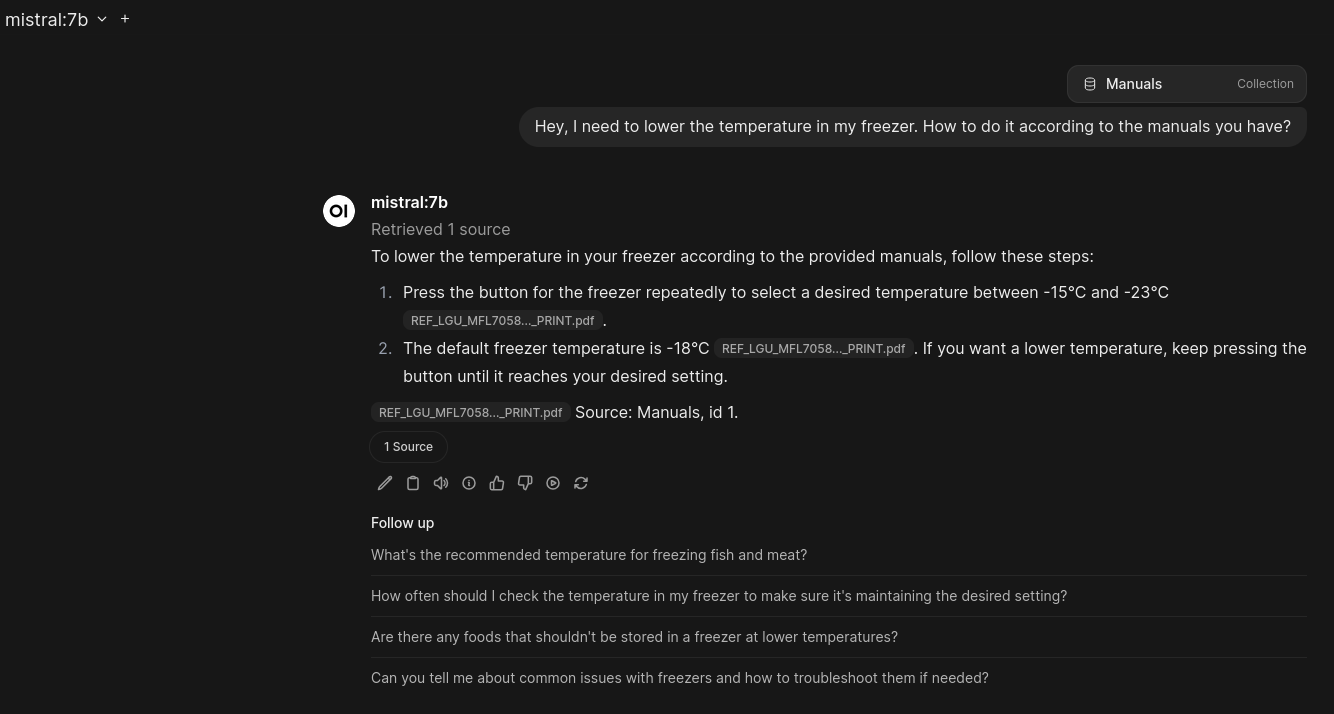
We also have some built in RAG. It works quite well for something that I didn't have to think about at all:
But wait, there's more! Using pyodide we can run python code snippets within browser. I originally thought this enables the agent to run the code itself and iterate on that, but no. Anyway, it works:

The default text-to-speech and speech-to-text worked too! Later I've learned that they use faster-whisper. But I'll have to admit I don't care that much about these features, I am more comfortable with a keyboard and reading.
Errors
As the features with built-in models use pytorch, I can't use them on the GPU due to this error:

It would be a boring article if it were that easy anyway. So let's pull our sleeves up and dive in. I want to learn about how all this works anyway.
Picking apart Ollama
Clone the repo some source code reading to figure out how it's set up.
The devs made a reasonable decision to use go for the "high-level" functions and include GGML C library for working with GPUs. Apparently, there's a "C" pseudopackage that enables you to glue these languages together.
The high level functions are various and plentiful. We have a built-in server that serves OpenAI-like API, command line interface, model management, thinking detection, tool calls, built-in browser and web-search for the LLMs, embedding support, multimodal support oh my!
What it misses is some auth enabled by default. Run it on a public internet and you enable the attackers to abuse your GPU.
Yea, I think I am not reimplementing all of that, kudos to the ollama team. Here are some things that caught my attention:
GGML in C
The C workhorse is GGML. That's a tensor library for machine learning. Of course, there are python alternatives like tensorflow. If you'd like to explore GGML in depth, here's an intro. Beware though, the authors claim that there might appear breaking changes anytime.
Later I've realized, that I am running CUDA sm_61. This seems to be compatible with GGML, but not the newest pytorch (requireds sm_70). So all of my local models would need to run here, unless I try a downgraded version of pytorch.
As I was trying various models, I wasn't able to run LLava at all. After googling for a while, I think I hit this bug in GGML. I've tried Gemma3 (since it supports vision) and it works well.
Importing Your Own Models
We have several options of implementing custom models. These include GGUF files, safetensors adapters/models (like you can see on hugging face, e.g. here).
A nice quality of life feature is direct support for hugging face imports. All you have to do is to find the thing and set ollama run hf.co/{username}/{repository}.
It also makes it quite easy to use your fine-tuned local models. That's an attractive feature for people with a stronger GPU to spare.
Ollama Software Bill of Materials
As a security guy I am interested in what am I actually injecting into my system. We've already looked at GGML, so let's take a look at go dependencies.
Of course, there are some google packages like protobuf or uuid. The windows binding package could use some love, last update from more than 6 years ago. Naturally, there are a couple packages which seem to be made by a single guy.
There's a dependency on a ByteDance (TikTok) library sonic for JSON parsing (and couple CloudWeGo dependencies as well). But seeing random assembly in the public github (admittedly, mostly scrubbed) is not something I like to see.
Ollama Models Are Almost Dockerfiles
Once you try to run a model you've downloaded, you'd need to write a "Modelfile". It sounds and looks a lot like Dockerfile. Example:
FROM ./SmolLM3-Q4_K_M.gguf
TEMPLATE """[INST] {{ .System }} {{ .Prompt }} [/INST]"""
SYSTEM """You are an assistant for question-answering tasks. Please answer the question in 3 sentences at most, be consice and factual. Finish your answer with </endreply>."""
PARAMETER num_ctx 4096
PARAMETER temperature 0.15
PARAMETER repeat_penalty 1.5
PARAMETER stop "</endreply>"
PARAMETER top_k 20
PARAMETER top_p 0.3
First you start with a model and then add your modifications in layers. On one hand, it copies the whole model again at least once, on the other hand once you start experimenting with different feature sets on the same model, the layers are reused and the system is quite efficient.
The models are usually saved at /usr/share/ollama/.ollama , which you don't normally see. Then you can see which exact blobs correspond to a model by looking at the manifest, example:
{
  "schemaVersion": 2,
  "mediaType": "application/vnd.docker.distribution.manifest.v2+json",
  "config": {
    "mediaType": "application/vnd.docker.container.image.v1+json",
    "digest": "sha256:77fb077ea8025c10d8fc958554a36340a73df9625163eda8ce33540d2e0cb409",
    "size": 491
  },
  "layers": [
    {
      "mediaType": "application/vnd.ollama.image.model",
      "digest": "sha256:8334b850b7bd46238c16b0c550df2138f0889bf433809008cc17a8b05761863e",
      "size": 1915305312,
      "from": "/usr/share/ollama/.ollama/models/blobs/sha256-8334b850b7bd46238c16b0c550df2138f0889bf433809008cc17a8b05761863e"
    },
    {
      "mediaType": "application/vnd.ollama.image.template",
      "digest": "sha256:e6836092461ffbb2b06d001fce20697f62bfd759c284ee82b581ef53c55de36e",
      "size": 42
    },
    {
      "mediaType": "application/vnd.ollama.image.system",
      "digest": "sha256:527ea1170bd12cad04218e6fd9a50d34b5fae372a950e8b8751405981592de7d",
      "size": 162
    },
    {
      "mediaType": "application/vnd.ollama.image.params",
      "digest": "sha256:9cda436e76c3dce545731dae1a2cfcb15cb2e2b8a23545d65fe1ec7ec8c3582b",
      "size": 113
    }
  ]
}
Popping The OWU Hood
I was surprised to see that I'm cloning a 300MB repository. So let's take a look at what makes OWU tick. I am also trying to convince myself that I cannot possibly build all of this myself.
It's a web app in Fast API
It's a python project, so I am quite at home. Built with hatch, let's take a look into pyproject.toml.
No black magic here, FastAPI is one of the more popular web frameworks for python. We're also pulling uvicorn, pydantic, sqlalchemy - the usual.
With regards to DBs, there are plenty of standard DB modules in the [all] version (which I have), including mongo, postgresql, oracledb, redis, mysql...
Last but not least, frontend is built with Svelte/Typescript. Look, I'm not a front-end guy (just look at this page), but I think it's worth a mention.
AI-adjacent Packages
Now we're getting to the fun stuff. These to me are AI related-but-not-quite-AI-direct for reasons that I can only explain in vibes.
It's not really surprising to see SDKs of the major providers of AI APIs - openai, anthropic, google. Obviously it's good to use official SDKs rather than implementing your own clients if you wish to call these services.
What I've found interesting is the solid foundation included to work with various documents. Pandas, openpyxl, pypandoc, pypdf, python-pptx, pillow (and couple others). I was surprised to see couple sound/video related packages like soundfile, pydub, pytube. These enable RAG for many such documents.
Another fun inclusions are the search engines like duck-duck-go, brave, bing, kagi... A whole another beast is firecrawl which sounds like scraping one-stop-shop (I need to try this out, but not now).
The ollama integration is tight, you can download models to your ollama from OWU, including those for embedding for RAG.
Generally, I like that there are built-in defaults and plenty of options to bring your APIs.
AI Packages
The other part of the equation. Of course, we have the langchain package, which I really have to learn on another day.
As I was digging through the packages, I got completely lost. So I've tried to build a dependency graph using pipdeptree. But first, let's download the open-webui to my laptop... and it has over 5GB (mostly in pytorch and CUDA).
There are some fantastic rabbit holes within these dependencies (such as the triton package1).
One of the reasons I've chosen OWU (yes, I am calling it that) is for the built-in RAG. The team did some serious work in there, they support multiple different vector DBs, reranking with ColBERT, and built-in sentence-transformers.
Couple of OCR options are included (Apache Tika, Azure Intelligence), but Rapid OCR seems to be built-in. We also have speech-to-text via Faster Whisper and text-to-speech via SpeechT5 and CMU Arctic.
New Understanding -> New Plan
Let's go couple of steps back to the error we saw previously.
I mean, I can go inside and try to find a pytorch version that supports my GPU and then modify the OWU with this older pytorch with a hope that nothing else breaks.
Or I can just use ollama, which uses GGML, which seems to work fine. Yes, number two won.
Another thing which seems to be currently unsupported is local/external image generation capability - it only points to the big providers. It seems that by changing OpenAI base URL to your URL and implementing the OpenAI interface will work.
Ollama doesn't directly provide stuff to use these tricks, but since we know we can use GGML, we can search for GGML solutions to these problems like stable-diffusion.cpp or Ollama-OCR.
Image Generation Via stable-diffusion.cpp
I really wanted to at least try and generate some images. As mentioned, we're rolling stable-diffusion.cpp, since that's the only image generation engine I was able to find which is built with GGML.
There are issues though. Not all models are supported, so we'll have to pick one of the prepared options. The other limitations is our 4GB of VRAM - I was only able to fit Chroma quantized to 2bit.
Everything else has to go to RAM. T5XXL which takes texts and sets it up for stable diffusion generation and VAE which does the opposite (hopefully) to work with diffusion output into pixels (check the docs for the support models compatible with your diffusion model).
These are the parameters that were able to finish with a picture:
chroma_generation.sh
#!/bin/bash
# running from the build directory within stable-diffusion.cpp repo

MODEL_DIR="../models"
DM="chroma-unlocked-v37-Q2_K-marduk191.gguf"
T5XXL="t5xxl_fp8_e4m3fn.safetensors"
VAE="ae.safetensors"

./bin/sd \
        --diffusion-model $MODEL_DIR/$DM  \
        --t5xxl $MODEL_DIR/$T5XXL \
        --vae $MODEL_DIR/$VAE \
        --cfg-scale 4.0 \
        --vae-tiling \
        --offload-to-cpu \
        --control-net-cpu \
        --clip-on-cpu \
        --vae-on-cpu \
        -v \
        --chroma-disable-dit-mask \
        --sampling-method euler \
        -p "$1"
After 15 minutes of intensive computing, I am able to get a single image:
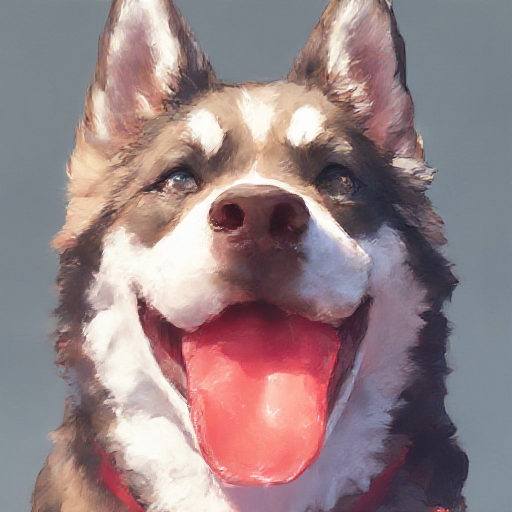
We are really scraping the bottom of the barrel here, if I ask for something slightly more complicated we can see the limitations clearly:

I was thinking of implementing the OpenAI interface so that I can integrate it with OWU (just a simple FastAPI wrapper around the bash thingy above).
However, I really don't have any VRAM to spare with this setup. Combined with the fact that the timeout would be around 15 minutes to hear an answer, I've decided against this integration.
Ministral3 8B
As I was writing this article, Mistral released new versions of their Ministral line of models, specifically Large, 14B, 8B and 3B parameters. Naturally, I had to try the 8B version on this setup. I thought I'll grab the weights and figure the rest from there.
Git Xet?
I went on to download the models from hugging face, only to be reminded that I need git xet to work with their super cool storage mechanism (no, plain old git won't do it). The old xet-core is deprecated as the team joined forces with huggingface.
But that's not enough. You still need to install git-lfs if you're not getting the big files.
And oh boy they are big. Even though the repository only has a couple of commits, somehow they take up around 100GB of space, so beware!
Converting safetensors to GGUF
Mistral doesn't yet provide GGUF weights in their repository. So we'll need to convert the weights ourselves. Llama.cpp has this small guide.
When I try to convert the instruct model, I hit an error, which seems to be related to quantization (which you can see configured here):
ValueError: Can not map tensor 'model.layers.13.mlp.gate_proj.activation_scale'Another thing to try is to get weights without quantization (in the bfloat16). Fortunately, they have them within the base repo (not instruct tuned, not reasoning tuned).
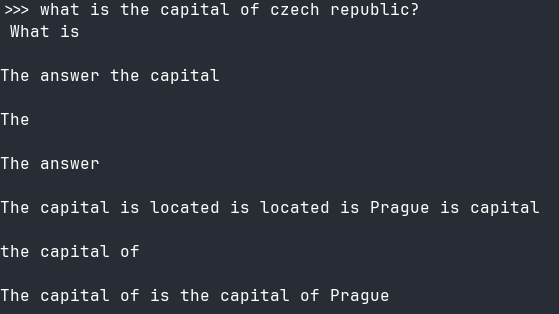
I've proceeded carefully with the 3B base model. I've converted it to gguf, but it seems that the base model is a bit undercooked:
I've tried quantizing using llama-quantize file.gguf file_Q4_K_M.gguf Q4_K_M so that it fits into the VRAM completely, but no dice.
Let's try again with the Ministral3-8B-Reasoning, which has the bfloat16 weights and should be better for chatting applications (somehow). Download it, convert to GGUF, quantize it.
Templates and system prompts
That's where I've noticed that Mistral provided their system prompt as well as a jinja template for how the model should communicate.
We can't use them directly as Ollama needs Go templates and there doesn't seem to be a good way of converting (plus we might not have all of the needed variables provided).
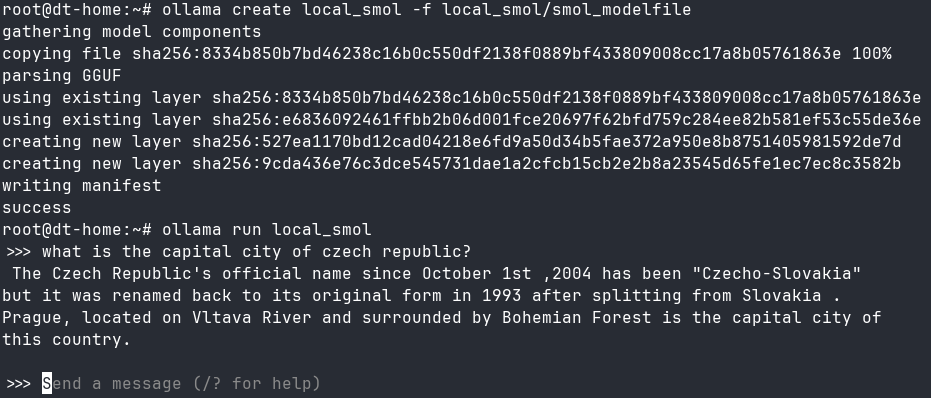
I've also realized that in the meantime they've uploaded ministral-3 into ollama repo. So I've copied the modelfile from that, thinking that was my mistake. It wasn't. I've examined the modelfiles and they are the same with the exception of the base model.
As I don't know how they've constructed the model layer, I don't know what broke and when. There are pointers about multimodal architecture having issues with GGUF conversions. There's also this lovely discussion pointing at me saying I don't have the faintest idea on what I am doing. I mean, they are not wrong.
I've tested it with SmolLM3-Q4_K_M.gguf and it worked well, so my bet would be the architecture/multimodality that somehow trips up locally.
What Have I Learned
In summary, you can do quite a lot even with an archaic setup.
The name of the game is VRAM, the more you have, the better capabilities you can deploy. To really get started with local LLMs, you don't need to reinvent the wheel, good open source projects have some of the most critical features implemented.
Working with drivers and CUDA is a bit of PITA, but I didn't find it that unmanageable. As always, to get best results you need the best and newest hardware, which comes with the best price tag.
You don't need to be a AI/ML/GPU expert to start experimenting with these models, but it'd certainly help. I'll admit that some of these concepts I don't understand at all, but hey, at the end of the day the thing produces tokens which make approximate sense to me, and that's what this all is about.
Pytorch seems to be the better setup as most models I've found try and support that, with GGUF seemingly being a distant second. There are some possibilities of transferring between the two, but it's not so simple.
When you start working with multi-modal stuff and image generation, expect pain.
Triton is a language and compiler for parallel programming. It aims to provide a Python-based programming environment for productively writing custom DNN compute kernels capable of running at maximal throughput on modern GPU hardware.
Now I feel the sudden urge to write a GPU native program with triton, just for the hell of it. But I don't know what kind of parallel program I need, so.. maybe later. Maybe it waits for a funny Advent Of Code day.